
Wonderkid2Legend Facepack
High-Quality Facepack for Football Manager
Same face, five life stages - your regen's face ages with your save, teen to veteran. Real variety from genetics and smart mapping - different looks for different nations, no clone squads inside a country. Easy to set up; staff get faces too. Unique age progression.
DOWNLOAD NOWIN-GAME PLAYER FACES
Denmark





Colombia





Kuwait





England





Ukraine





Italy





Portugal





Cape Verde





Nigeria
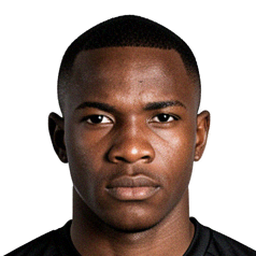
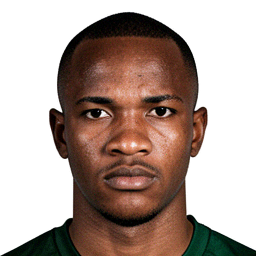
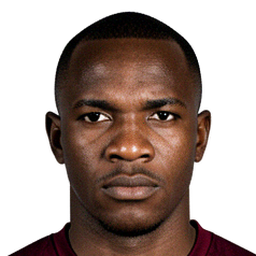


India





Vietnam





Samoa





South Korea
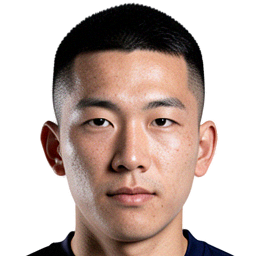




Preview of in-game player portraits included in the Wonderkid2Legend Facepack.
Features
What makes the Wonderkid2Legend Facepack different: age-accurate faces, genetic variety, and mapping that fits the game.
- Unique age progression - Same face, five life stages. Your regen’s face ages with your save - teen to veteran - so no bearded wonderkids. The mapper picks the right bracket (15 - 19 to 36 - 40) as the years roll on.
- Built from genetics - Faces are generated using ethnic and genetic traits, so you get real variety: different looks for different nations and backgrounds.
- Smart mapping - Real variety inside every nation - not the same faces over and over again for a country. The mapper uses ethnic groups, neighbours, and second nationalities so you get believable diversity, not clone squads.
- Easy to use - Download, run the mapper, drop files where it says. No tech skills needed.
- Staff faces too - Managers and staff get the same quality faces, not just players.
DOWNLOAD
Get the facepack and the mapper app. Use the mapper (and the included filters/views) to link faces to your game and import them into Football Manager.
DOWNLOAD FACEPACK
Get the full facepack with player and staff faces. Includes the filters/views to import into Football Manager.
Download FacepackDOWNLOAD APP
The mapper app links your facepack to the game. Point it at your facepack folder and RTF exports - it generates config.xml for you.
Download AppINSTRUCTIONS
Full steps from RTF export in Football Manager to in-game faces.
1. Download the facepack and install filters/views
- Download the Facepack and the Mapper app from the Download section above. The facepack includes a
filtersfolder and aviewsfolder. - Extract the facepack into your FM graphics folder, e.g.
Documents → Sports Interactive → Football Manager 2024 → graphics. Use a folder name likeWonderkid2Legend Facepack. - Copy everything in the facepack’s filters folder into
Documents → Sports Interactive → Football Manager 2024 → filters. - Copy everything in the facepack’s views folder into
Documents → Sports Interactive → Football Manager 2024 → views.
2. In-game: create a new unemployed manager
Create a new unemployed manager in your save and do all of the steps below as that manager, so “Players in Range” and the export are from a global scope.
3. Scouting → Players in Range
- Go to Scouting → Players in Range.
- View: Click the view dropdown (e.g. “Overview”) → Custom → Import View → choose SCRIPT FACES player search.fmf (from the views you installed). Select that view (it may show as “NewGAN” or similar).
- Filter: New Search → cog (bottom left) → Manage Filters → Import → select is newgen search filter → Load. Back in the search popup: cog → select is newgen search filter.
- Optional: in the filter area, use the Exclude dropdown and uncheck your team so your club’s regens aren’t in the list.
- You should see UID, Nationality, 2nd Nationality, Name, etc. Check that you’re looking at regens only.
4. Export the list (your RTF file)
- Click one row, then Ctrl+A to select all. (If the list is huge, wait until selection is done.)
- Ctrl+P (Print). In the dialog, choose Text File and save the file (e.g.
players.rtf). That’s your Players RTF. - Optional: repeat from a Staff view (with the right view/filter) to get Staff RTF. Staff mapping only includes regen staff.
5. Run the mapper
- Open the Mapper app.
- Select your Facepack folder (e.g.
Wonderkid2Legend Facepackinside your FM graphics folder). - Select your Players RTF file. Optional: select Staff RTF if you exported staff.
- Click Run. The app writes
config.xmlin the facepack folder.
6. Reload in Football Manager
Go to Preferences → Reload Skin (or restart the game). Your faces should now appear in-game.
COMING SOON
- More and better faces, with more unique looks
- Support for Football Manager 2026
- Support for Mac
- No RTF export needed - simpler setup